Public ServiceNow, Microsoft and Salesforce documentation
WHY I EXPLORED THIS
HOW CAN SERVICE COORDINATORS ACT WITHOUT LOSING CONTEXT?
A broken lift, a water leak or a ventilation failure can quickly disrupt the working day in a commercial building. Behind each maintenance request, someone has to piece together what happened, coordinate the response and follow the work through to resolution.
I designed a workspace that brings together communications, documents and tasks so the coordinator can understand the situation and organise the next steps. This independent concept draws on public documentation; scenarios and data are fictional.
INTERACTIVE CONCEPT
Try this scenario: open the ventilation request, read the message, then use View alongside to open Files beside it and compare the conversation with the documents. Explore the workspace, then see the decisions behind it below.
RRelay
RC
Service requests
0 selected
Service request
Attention
Site
Status
Target
Coordinator
RC
NEXT COORDINATION ACTION
Continue issue assessment
In progress
TKT-001Assigned to you
Your review is required before dispatch.
Response target
1h 35m left
Due today · 16:30
EMAIL
Ventilation alarm · Level 4
JC
Jamie ColeToday, 09:18 · Rivergate House
Hello,
The ventilation on Level 4 has stopped after a sensor alarm. The east meeting rooms are becoming warm. I have attached two photos from the local panel.
No matching activity foundTry another keyword or clear the current filters.
THE CHALLENGE
ONE REQUEST, MULTIPLE RESPONSIBILITIES
A maintenance incident needs one shared record, but resolving it can involve separate tasks, owners and decisions.
Keeping everything in one record makes individual responsibilities and progress harder to distinguish. Splitting the work into independent tickets risks fragmenting the context.
My challenge was to make each piece of work clear and actionable, with enough context to support a decision without overwhelming the current task — while keeping it connected to the overall request.
USER JOURNEY
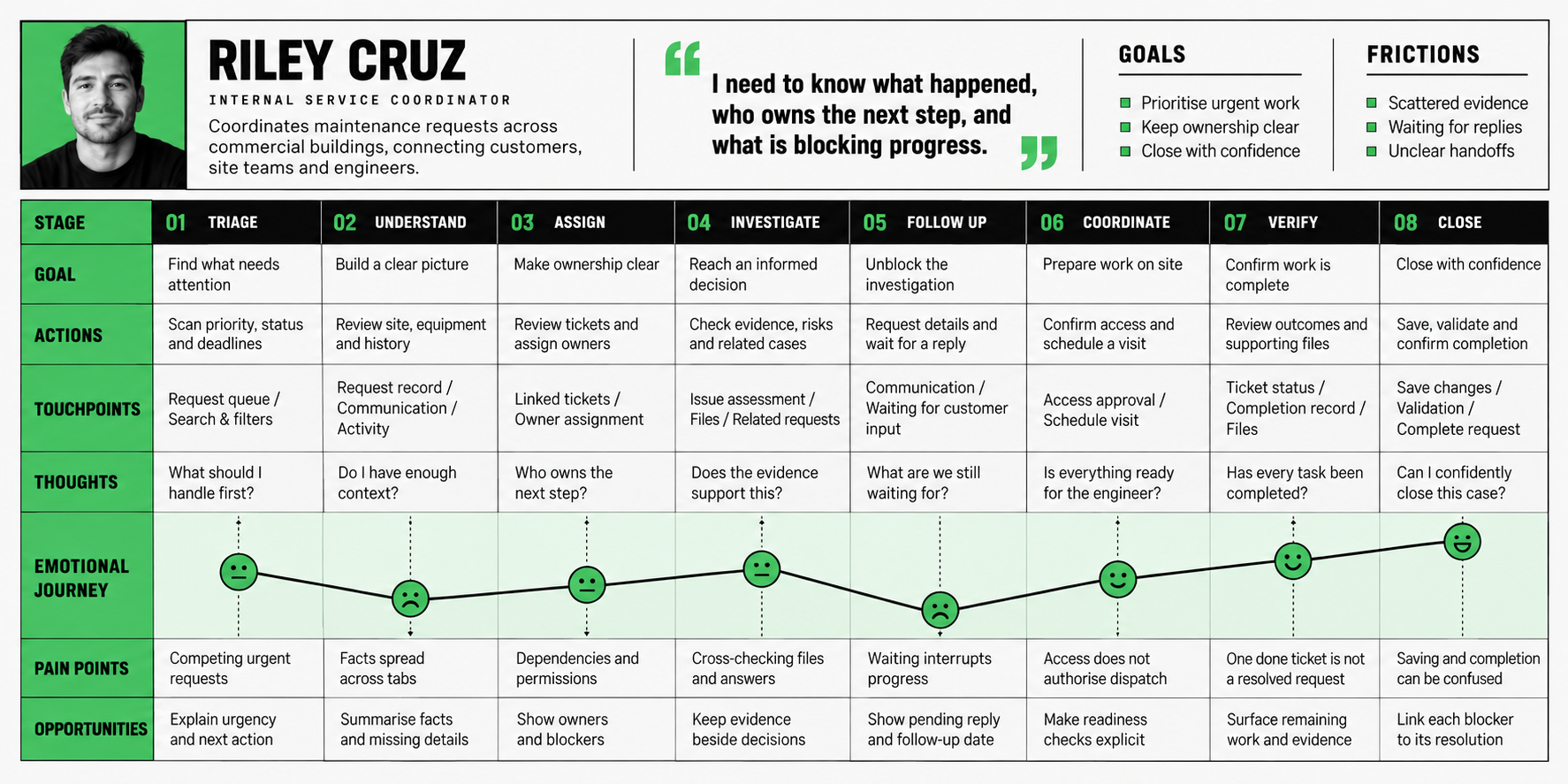
SERVICE COORDINATOR JOURNEY
This is a proposed journey for an independent concept. The persona and emotional curve illustrate the scenario and assumptions to explore further.
COMPETITIVE LANDSCAPE
REFERENCE PRODUCTS FOR SERVICE COORDINATION
The map compares workflow flexibility and service scope, from handling requests to coordinating work on site. The closest references are highlighted in green. Placement reflects a qualitative review of public product documentation.
INFORMATION ARCHITECTURE
AN OVERVIEW, A SHARED RECORD, SEPARATE WORK TICKETS
I organised the concept into three levels, each answering a different question:
What needs attention?
Request overview
A queue of requests with priorities, statuses and deadlines helps the coordinator choose where to begin.
What is happening?
Request
The shared incident record brings together site and equipment details, communications, files, activity and linked work tickets.
What work is assigned, and to whom?
Work ticket
A defined task has its own owner, status and completion requirements, and stays linked to the request.
For example, the ventilation request contains an issue-assessment ticket assigned to Riley Cruz and a site-access approval ticket assigned to Elliot Ward. Assessment brings questions and supporting evidence together; access approval records contact and authorization confirmations. Both remain connected to the same incident.
The trade-off: separate work tickets make ownership and progress explicit, but introduce another level of navigation. The interface therefore keeps the request reference visible and provides a route back to its ticket list.
This structure connects the coordinator’s journey to the interface: the queue supports prioritisation, the request keeps context together, and linked tickets make individual responsibilities and completion requirements explicit.
KEY DESIGN DECISIONS
WORKING WITH CONTEXT
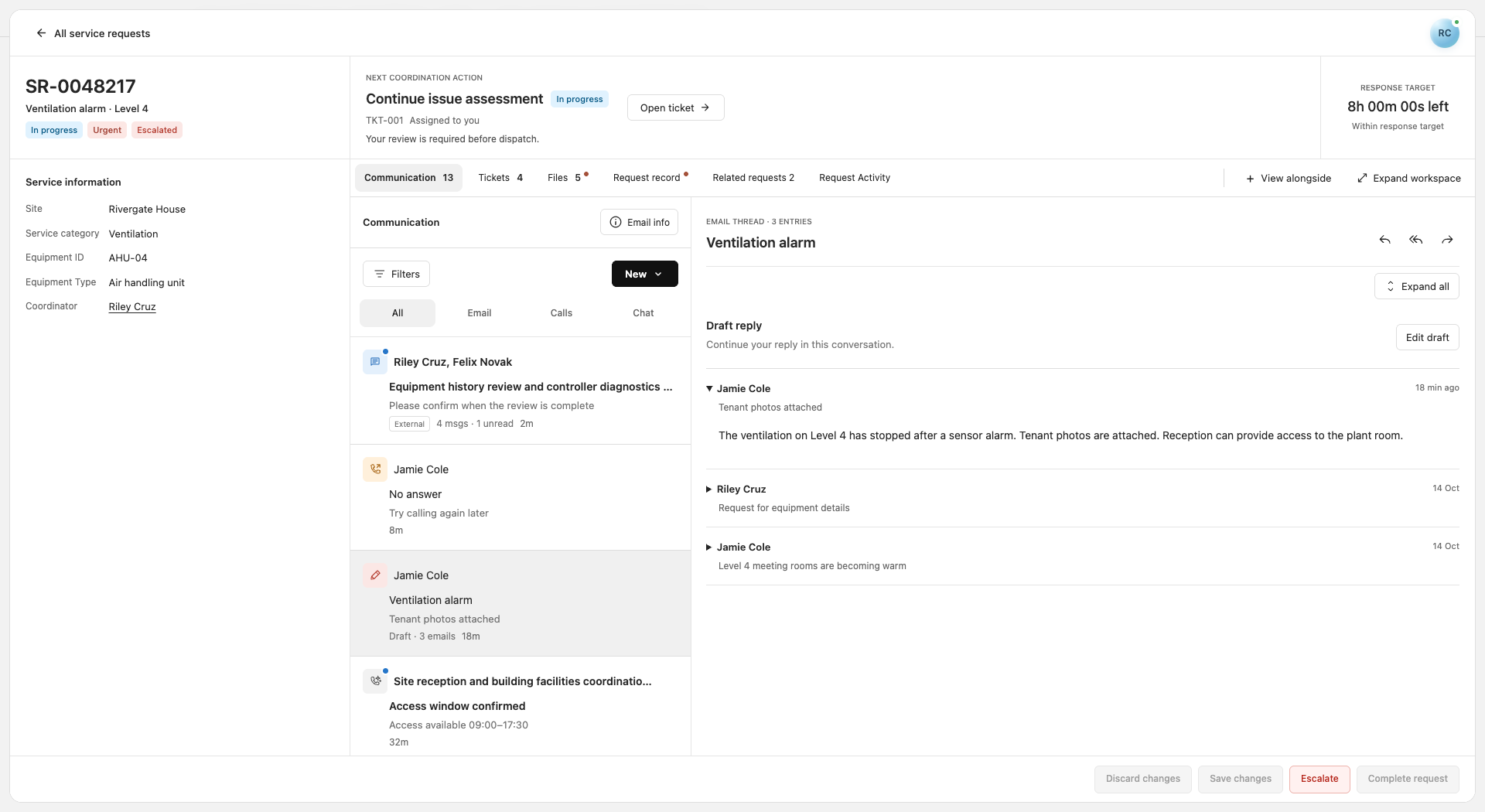
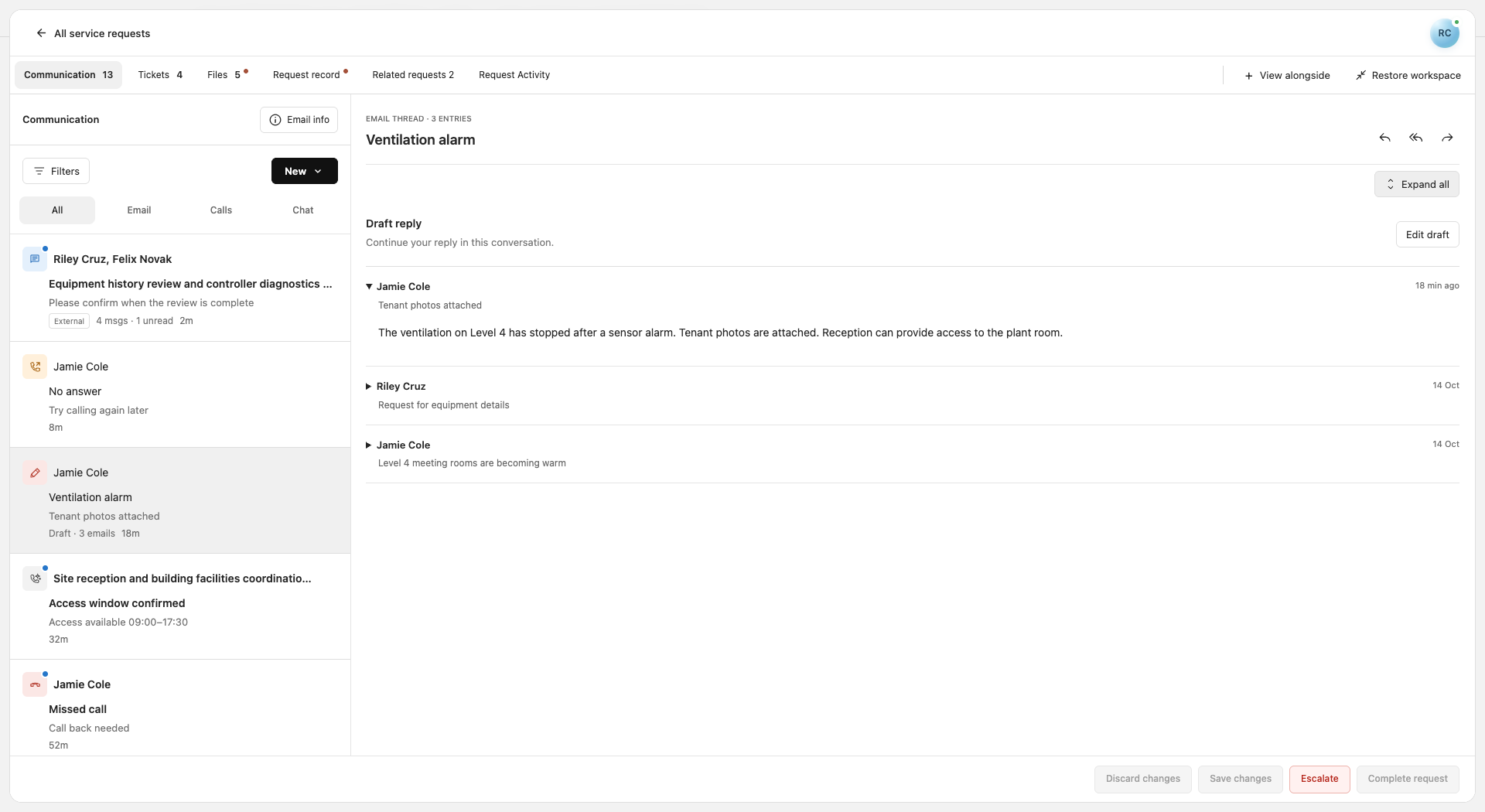
The coordinator needs to assess the whole situation before closely inspecting communications or documents. I chose two modes with a one-button switch: collapsing panels one by one adds clicks, while freely configuring the whole layout adds setup effort. Within tabs, splitters and expandable panels support detailed work without rearranging the whole screen.
Request overview ↗Expanded context ↗
Details when needed. To avoid showing everything at once, I used progressive disclosure: message or file information opens on demand, and related sections open alongside one another for comparison. Panel state persists when switching files so unexpected layout changes do not interrupt the work.
Message information on demand ↗Files alongside communication ↗
FROM OVERVIEW TO DETAIL
In this concept, I explored how to give coordinators a complete view of a request and let them examine the details while keeping the context. Workspace switching, additional panels and AI summaries support this transition. The next step is to test with coordinators whether this approach helps them compare communications and documents and decide what to do next.